
Does your practice
actually work?
Most golfers practise for hours without knowing whether any of it helped. Film a swing, get the one thing to fix, practise with a plan, film again — and find out.
iPhone · iOS 17 or later · Android in development
Scroll for more →
Film. Fix one thing. Practise. Check.
Every part of the app feeds the next one. It's a loop, not a pile of numbers.
Film
Prop up your iPhone face-on or down the line. An on-screen guide checks level, framing and club room before it records, in slow motion where your iPhone supports it. Or import a clip you already have and trim it to the swing that counts.
Analyse
Body tracking measures your setup, backswing, top, downswing and finish — 15 metrics, normalised by torso length so camera distance doesn't skew them.
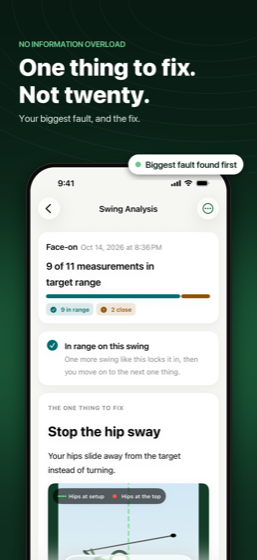
One thing to fix
Your biggest fault, shown on your own swing: what it is, why it matters, and the feel that fixes it. It stays your focus until it's been in range on two swings in a row — so you stop chasing a new tip every swing.
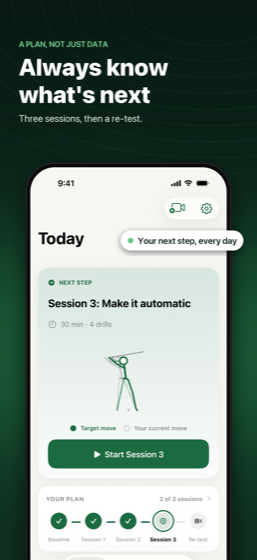
A plan, not just data
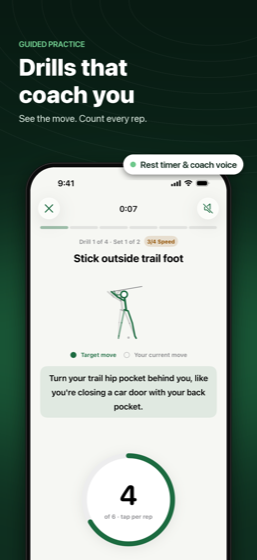
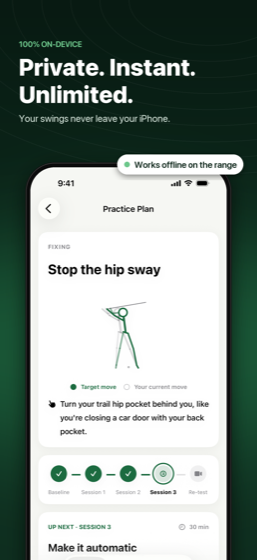
Three short sessions that build from slow-motion with no ball, to half swings, to full speed — with drills chosen for your fault.
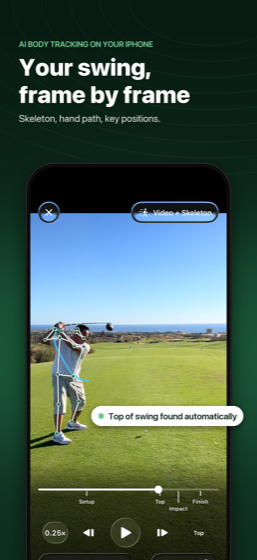
Replay and draw
Scrub frame by frame with the skeleton and hand path drawn over your swing. Jump to setup, top, impact or finish, slow it to a tenth speed, and draw lines, circles and angles like a coach would.
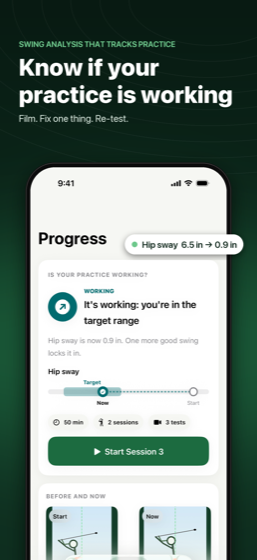
Is it working?
Re-film and GolferAI re-measures the same thing. You get a straight verdict — working, too early to tell, plateau, or regressing — plus which drills seem to be helping.
Fifteen measurements, from two angles
Distances are normalised by your torso length, so results don't change with camera distance, and are shown in inches or centimetres based on your height.
Face-on
Hip sway, head drift, weight shift at impact, hanging back, hip slide, finish balance, shoulder and hip turn, X-factor, reverse spine.
Down the line
Setup posture, knee flex, early extension, loss of posture, and over-the-top hand path.
Both angles
Tempo ratio, lead-arm bend at the top, and head height through the swing.
What it doesn't do: GolferAI measures your body, not the club or the ball. Club face angle and club path aren't measured.
Your swing never leaves your phone
There is no account, no sign-in and no server. Body tracking and every part of the analysis run on your iPhone, so your swing videos are never uploaded — not to us, not to anyone.
No ads. No analytics. No tracking SDKs. It also means the app works fine at the range with no signal. Full detail in the privacy policy.
Try three swings first
Your first three completed analyses are free — failed ones don't count. Practice, history and progress stay free forever. Pro unlocks unlimited analyses.
Yearly
per year, with a 1-week free trial
Monthly
per month
Lifetime
one-time purchase
Prices are US App Store prices and are set locally by Apple in other countries. Subscriptions renew automatically until cancelled — the full terms are in the Terms of Use.
Questions, answered
How should I film my swing?
Face-on or down the line, with your whole body and some room for the club in frame. The app checks level, framing and size before it records and shows an illustrated guide before your first swing. If a recording causes trouble, the result tells you exactly what went wrong and offers a Re-film button.
My analysis failed or the app said body tracking isn't available.
Body tracking needs a real device — it can't run in the iOS Simulator. On a phone, failures are nearly always framing or light: get your whole body in frame, film straight face-on or straight down the line rather than at an angle, and avoid heavy backlight. Failed analyses don't count against your free three.
Does it track the club or the ball?
No. GolferAI measures your body, and infers hand path from your hands — so club face angle and club path aren't measured. We'd rather tell you that than imply a precision the app doesn't have.
Do my swing videos get uploaded?
No. Recording, body tracking and every bit of analysis happen on your iPhone. There is no account, no sign-in and no server. It works at the range with no signal.
How do I restore a purchase?
Restore Purchases is on the paywall and in Settings. Purchases are tied to your Apple Account, so they come back on a new phone once you sign in with the same account.
How do I cancel a subscription?
Settings → your Apple Account → Subscriptions on your device, at least 24 hours before the period ends. Cancelling is handled by Apple, not by us. Deleting the app does not cancel a subscription.
Is there an Android version?
A native Android app is in development, running the same analysis engine. No release date yet.
Still stuck?
Email mohsin@dnadeveloper.com and describe what happened — the angle you filmed from and what the app showed is usually enough to work out the cause. A real person reads every message.
GolferAI — analysis that runs on your iPhone.
Terms of Use · Privacy Policy · Support